
Voice Changer
A modern Figma mobile app design for audio recording, video recording, text-to-audio conversion, saved audio files, language selection, and premium upgrade flows.
+90%
+55%
+40%
96%
Project Overview
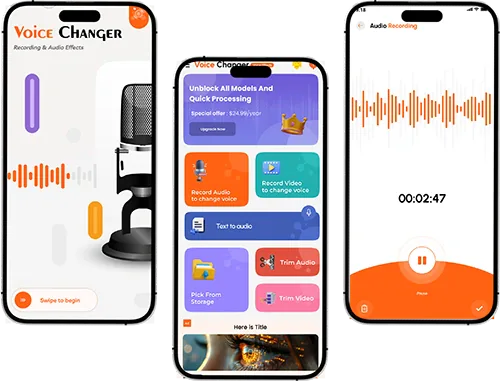
We designed a mobile-first Voice Changer UI in Figma with a focus on recording tools, language selection, premium upgrade flow, saved audio files, sharing actions, and easy access to creative audio features.
Client
Voice Changer
Industry
Audio / Entertainment
Services
Figma UI Design, Mobile App UX, Audio App Screens, Prototype
Project Type
Mobile App UI/UX
Turning Business Challenges Into Scalable Solutions
Every project starts with a real business problem. We identify the gaps, simplify the workflow, and build a solution that improves user experience, performance, and operations.
The Challenge
Voice and audio apps usually include several tools such as recording, video recording, text-to-audio, trimming, file history, sharing, language selection, and premium upgrades. The challenge was to organize these features in a simple mobile experience without making the interface feel crowded.
Create a simple onboarding and app entry experience
Make audio recording and video recording easy to access
Present language selection in a clean and readable layout
Keep premium upgrade flow visible without feeling forced
Organize saved audio files and history clearly
Design tool cards and recording screens with strong mobile usability
Our Solution
We designed a clean and creative Figma mobile UI with clear feature cards, recording screens, waveform feedback, premium upgrade layout, language selection, saved audio files, sharing modal, and lightweight navigation.
Designed an intro screen with strong audio-focused branding
Created language selection and premium upgrade screens
Designed a home dashboard with audio tools and saved files
Created audio recording screens with timer and waveform feedback
Designed video recording and text-to-audio entry screens
Added history, sharing, settings, and file management layouts
Design Impact
Measurable improvements delivered through strategy, design, and development.
+90%
Flow Clarity
The screen structure made recording, tools, and saved files easier to understand.
+55%
Feature Discovery
Tool cards helped users quickly identify record audio, record video, text-to-audio, trim audio, and file options.
+40%
Upgrade Intent
The premium screen was designed to make upgrade benefits visible and easy to review.
Voice Changer App Screens Showcase
Explore key Voice Changer Figma screens, including onboarding, language selection, premium upgrade, audio tools, recording, video recording, active waveform recording, and saved audio file management.
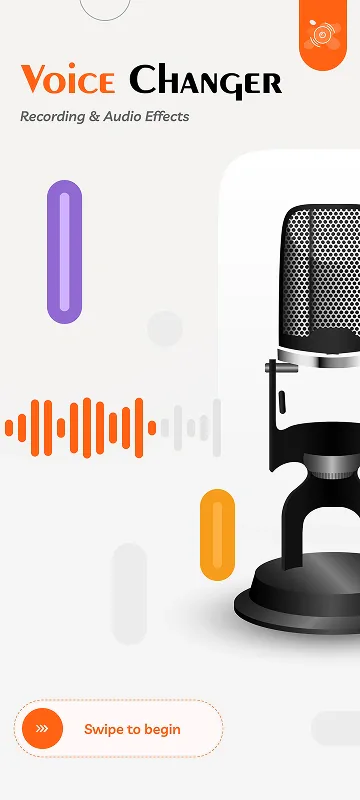
App Intro Screen
A clean intro screen presenting the Voice Changer app with microphone-focused visuals and a simple entry action.
Our UI/UX Design Process
We followed a structured Figma design process to plan, design, refine, and organize the Voice Changer mobile app experience across onboarding, recording, audio tools, premium upgrade, history, and sharing flows.
Discovery & App Flow Planning
We reviewed the app concept, target users, audio recording needs, video recording flow, text-to-audio feature, language selection, premium upgrade journey, and file management experience.
Design Tools Used
The stack was selected for performance, scalability, and maintainability.
Figma
UI Design & Prototype
Mobile App UI
Interface Design
UX Flow
Audio Tool Journey
Design System
Reusable Mobile Components
Key Screens Designed
Core features designed and delivered for this project.
Audio Recording
Recording screens with timer, microphone action, waveform feedback, and save controls.
Video Recording
Video recording flow with camera preview, recording timer, and audio waveform support.
Text to Audio
Entry flow for converting text into audio using a simple tool-based interface.
Saved Audio Files
History and file management screens for saved recordings, uploaded audio, and generated files.
Language Selection
A clean language selection screen for improving app accessibility and user personalization.
Premium Upgrade
Upgrade screen designed to present premium benefits, feature access, and subscription intent.
Related Projects
Explore more projects from similar categories.
Need a mobile app UI?Let’s design an app users enjoy
We create clean Figma mobile app interfaces for audio tools, creative apps, social apps, subscription products, and modern mobile-first experiences.
Frequently Asked Questions
Find quick answers to the most common questions about our services, process, and support.
Voice Changer is a Figma-based mobile app UI/UX design project created for audio recording, video recording, voice transformation, text-to-audio conversion, file management, language selection, and premium subscription experiences.
Can't find what you're looking for?
Our support team is ready to answer your questions.