
Car Cheq
A clean Figma UI/UX design for a car inspection platform, created to organize vehicle checks, inspection forms, visual checkpoints, evidence uploads, and admin review workflows.
Figma UI
Inspection UX
Admin UI
Report Flow
Project Overview
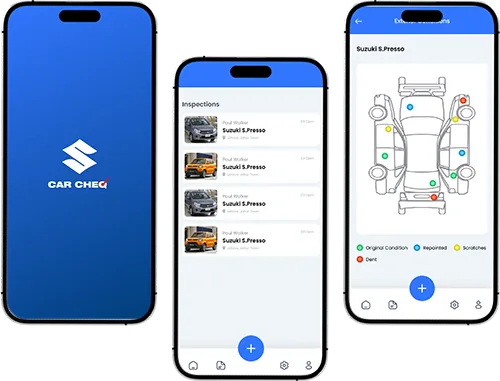
We designed a complete Figma UI/UX concept for an automotive inspection product, covering mobile app screens for users and management-focused screens for inspection workflows. The design includes onboarding, authentication, inspection forms, vehicle checkpoint diagrams, evidence upload, profile screens, report views, and inspection management layouts.
Client
Car Cheq
Industry
Automotive
Services
Figma UI Design, UX Flow, Mobile App Screens, Dashboard UI
Project Type
Mobile App UI/UX
Turning Business Challenges Into Scalable Solutions
Every project starts with a real business problem. We identify the gaps, simplify the workflow, and build a solution that improves user experience, performance, and operations.
The Challenge
Vehicle inspection platforms need to present technical checks, reports, images, and inspection records in a way that is easy to follow. The challenge was to design a mobile-first inspection experience with clear forms, visual checkpoints, evidence upload, and report screens without making the flow feel complicated.
Create a smooth onboarding and authentication flow
Organize long inspection forms into readable mobile screens
Show vehicle inspection points visually through car diagrams
Support image upload for inspection evidence
Design profile and report screens for inspection history
Create management screens for users, partners, inspections, and reports
Our Solution
We designed a clean Figma UI system with mobile app screens for inspection workflows and dashboard-style screens for management. The layout uses a blue and white visual style, simple navigation, inspection cards, vehicle diagrams, forms, upload modals, status labels, and dashboard tables.
Designed splash, welcome, login, and signup screens
Created inspection list and detailed inspection form screens
Designed exterior and interior vehicle checkpoint views
Added evidence upload screens for inspection images
Created profile and report-related mobile app screens
Designed management layouts for users, partners, inspections, and reports
Design Highlights
Measurable improvements delivered through strategy, design, and development.
Guided
Inspection Flow
The mobile app screens are structured around step-by-step vehicle inspection, helping users move from inspection lists to detailed checks and vehicle condition review.
Visual
Vehicle Checkpoints
Exterior and interior vehicle diagrams make inspection points easier to understand through visual markers and condition indicators.
Organized
Report Experience
The report and profile screens give users a clear way to review inspection results, history, and vehicle-related data.
Car Cheq App Screens Showcase
Explore the key Car Cheq mobile app screens, including splash branding, onboarding, account setup, inspection list, guided inspection forms, vehicle checkpoints, evidence upload, profile, and inspection report flow.

Splash Branding
A clean splash screen introducing the Car Cheq brand with a simple blue automotive identity.
Our UI/UX Design Process
We followed a structured Figma design process to plan, design, refine, and organize the Car Cheq experience across mobile inspection flows, vehicle reports, evidence upload, user profiles, and management screens.
Discovery & Product Flow Planning
We reviewed the vehicle inspection concept, user roles, inspection requirements, report structure, evidence upload needs, and management flow.
Design Tools Used
The stack was selected for performance, scalability, and maintainability.
Figma
UI Design & Prototype
Mobile App UI
Inspection App Screens
Dashboard UI
Admin Management Screens
Design System
Reusable App Components
Key Screens Designed
Core features designed and delivered for this project.
Onboarding Flow
Splash, welcome, login, and signup screens for a smooth app entry experience.
Inspection List
A structured list view for managing and starting vehicle inspections.
Guided Inspection Forms
Detailed inspection forms designed to organize vehicle questions and condition checks.
Vehicle Checkpoints
Visual car diagrams to highlight inspection points, damage areas, and condition markers.
Evidence Upload
Photo upload screens for adding inspection proof and vehicle images.
Inspection Reports
Report and summary screens for reviewing inspection status, notes, and final approval.
Related Projects
Explore more projects from similar categories.
Need a mobile app UI like Car Cheq?Let’s design your product experience
We create clean Figma UI/UX designs for mobile apps, dashboards, portals, inspection tools, automotive platforms, and business workflow products.
Frequently Asked Questions
Find quick answers to the most common questions about our services, process, and support.
Car Cheq is a vehicle inspection mobile app UI/UX project designed in Figma. The project includes onboarding screens, inspection workflows, vehicle checkpoint views, evidence uploads, inspection reports, user profiles, and management-focused interfaces.
Can't find what you're looking for?
Our support team is ready to answer your questions.